

The first mechanical keyboard question I get from friends is never about switches or keycaps. It is always: "How do I even start?" They have seen the gaming setups online, they know a mechanical board is supposed to feel better than the rubber dome one they have been using for years, and then they hit a wall of jargon. Linear, tactile, clicky, hot-swap, full-size, tenkeyless, polling rate. It is a lot. I have been building and upgrading PCs for about twenty years, and I still remember staring at that wall myself. So here is the practical version: a step-by-step way to pick your first mechanical gaming keyboard, using the Logitech G413 SE as the working example of what to look for.
I have been using the Logitech G413 SE on my main rig for about a month now, evenings and weekend sessions with my son Owen. It is not the most expensive board I have owned, and it is not the flashiest. It is the one I would hand to someone buying their first mechanical keyboard, and this guide is built around exactly why.
Start with a board that gets the basics right
The Logitech G413 SE is a full-size mechanical keyboard with tactile switches, a sturdy aluminum top plate, and none of the software fuss that scares off first-timers. It is the board I recommend when someone asks me where to start.
Amazon Check Today's Price on Amazon →Step 1: Decide which size actually fits your desk
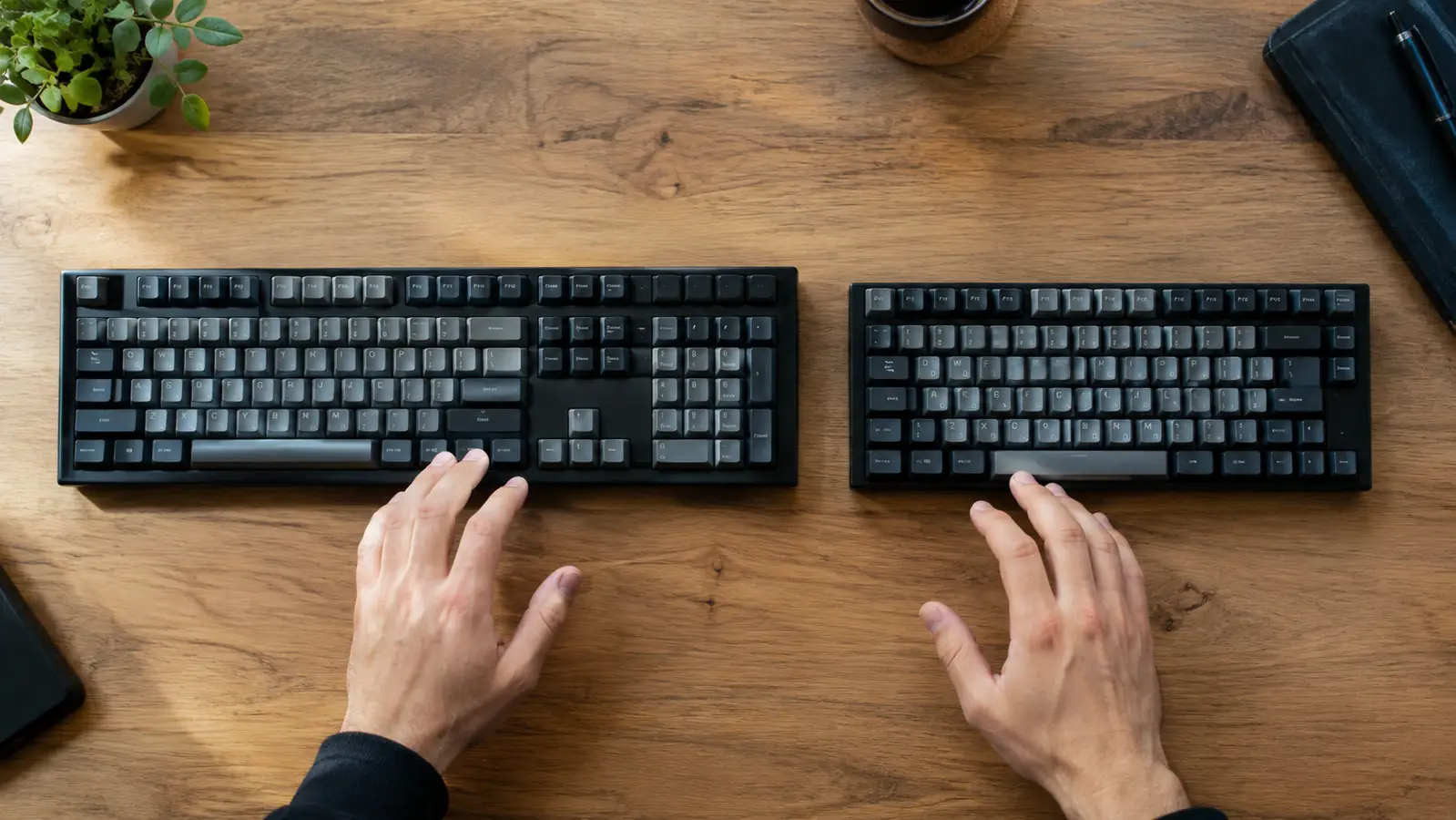
Mechanical keyboards come in three main sizes. Full-size keeps the number pad, the arrow keys, and the navigation cluster. Tenkeyless, or TKL, drops the number pad. Sixty percent drops everything except the main typing area. The right choice depends on what you do at that desk, not on what looks cool in a photo.
My desk is a corner unit in a spare bedroom that doubles as my home office. I do IT support during the day, so I am typing numbers and IP addresses constantly. The number pad is not optional for me. That is the first reason the Logitech G413 SE made sense: it is a full-size board, so I get the layout I need without an extra USB numpad cluttering the desk. If you never type numbers, a TKL board saves space and looks cleaner. If you are on a tiny desk, a 60 percent board might be the honest answer. Measure your space before you fall in love with a layout. Before I settled on the G413 SE, I spent a week using a tenkeyless board a friend loaned me. It looked great on the desk, but every time I needed to type a subnet mask or enter a product key, I found myself reaching for a number pad that was not there. I kept a cheap USB numpad beside it for about two days before I gave up. That experiment is the whole argument for measuring your actual work before choosing a layout. My corner desk has a 30-inch-wide section for the keyboard, and the full-size G413 SE fits with room to spare, so the only reason to go smaller was aesthetics.
One thing I will say about the G413 SE specifically: the full-size layout is laid out exactly like a standard keyboard, so there is zero relearning. That matters more than people think. The first mechanical keyboard should not make you hunt for the backslash key in the middle of a workday.

Step 2: Pick a switch type by how it feels, not by what gamers use
The switch is the mechanism under each keycap, and it is the whole personality of a mechanical keyboard. There are three families. Linear switches go straight down with no bump. Tactile switches give a small bump partway down so you can feel the moment the key registers. Clicky switches do the same but add an audible click. None of them is objectively best. They are different tools.
The Logitech G413 SE uses Logitech G's own tactile switches, and they are a smart choice for a first board. The bump is noticeable but not aggressive, so you get the feedback that makes mechanical keyboards feel good without the noise that makes office mates glare at you. I have typed on clicky boards that sound amazing for five minutes and exhausting after an hour. The G413 SE sits in a comfortable middle: you can feel every keystroke, and the sound stays at a level where I do not mind using it during a workday.
If you can, find a store with display boards and press a few switches before you buy. If you cannot, buy from somewhere with a decent return policy and be honest with yourself about what your fingers like. The good news is that the G413 SE's tactile switches are a safe default. They are the vanilla of switches in the best way: reliably good, easy to live with, and unlikely to disappoint. Last month I took Owen to a store that had a wall of display keyboards. He pressed a clicky switch board for about ten seconds and said it sounded like a typewriter, then spent five minutes pressing the same key over and over. I did the same on a linear board and understood immediately why people describe linear as smooth: it is, but it gave me nothing to feel, and I kept bottoming out harder than I needed to. That five-minute test taught me more than any spec sheet. If you cannot find a display wall, order one board, live with it for a week, and trust your fingers over the marketing.
Step 3: Check the build quality where it actually matters
A keyboard gets touched thousands of times a day, so build quality is not a spec sheet detail. It is the difference between a board that feels solid for five years and one that creaks after six months. The places to check are the top plate, the keycaps, and the overall rigidity when you twist the board.
The Logitech G413 SE has an aluminum top plate, which is genuinely unusual in this class. I noticed it the first time I picked it up: the board has a cold, solid feel that plastic-only boards do not. It does not flex when I type hard, and it has not developed any creaks in the month I have been using it. The keycaps are double-shot, which means the lettering is molded through the plastic rather than printed on top. That matters because printed lettering wears off. I have seen it happen on cheaper boards within a year. Double-shot keycaps should still look new after years of use. One small test I do with any keyboard is a twist: I grab the top corners and try to flex the board. The G413 SE does not move. I also checked the keycaps after a month of daily use, because I have seen printed legends start to fade on cheaper boards in that time. The double-shot legends on this board look exactly as they did the day I unpacked it. The only thing I changed was the cable routing: I tucked the thick fixed cable under my monitor stand and used one small cable clip to keep it from drooping over the edge of the desk.
The one build complaint I have is the cable. It is a thick, fixed cable that does not detach from the board. That makes the keyboard harder to pack up and slightly harder to route cleanly around a desk. It is a minor thing, and I would still buy the board again, but it is worth knowing before you commit.
Step 4: Decide how much software you want in your life
Gaming peripherals love to ship with a companion app, and those apps are often the worst part of the product. They want to update firmware, sync lighting, and phone home. For a first mechanical keyboard, I recommend asking a simple question: what happens if I never install the software at all?
The Logitech G413 SE is refreshing here. It is a wired board with no RGB lighting, so there is no software requirement. Plug it in, and it works. The only software in the picture is Logitech G HUB, and you only need it if you want to remap keys or set up onboard profiles. I have used it once, set a couple of macros for a game Owen and I play, and then ignored it. The keyboard does not nag you, and it does not need the app running to remember your settings. For a first board, that simplicity is a feature, not a missing one.
If you are the kind of person who loves customizing every LED, this is not the board for you. There is no lighting to customize. But if you are the kind of person who just wants a keyboard that works the same way every day, the G413 SE is close to perfect.
Step 5: Set a realistic budget and know what you are paying for
Mechanical keyboards range from budget boards to custom builds that cost more than a graphics card. For a first board, the sweet spot is the range where you get a solid metal or reinforced plastic case, decent keycaps, and reliable switches without paying for features you will not use. You do not need wireless, you do not need per-key RGB, and you do not need hot-swap sockets on day one.
The Logitech G413 SE sits right in that sweet spot. It is not the cheapest mechanical keyboard you can buy, but it is cheaper than most boards with an aluminum top plate and a brand name you can trust. What you are paying for is the stuff that affects how it feels every single day: the switches, the build quality, and the reliability. What you are not paying for is a light show. I think that is the right trade for a first board. I set a simple rule for myself when I picked this board: spend like you are buying a new game, not a new graphics card, and put the money into the parts I touch. That rule points straight at the G413 SE. It also helped to think about lifespan. My previous keyboard was a membrane board I used for six years, so even a modest mechanical board is a better value per year if it lasts. I expect this one to outlast that, given the aluminum top plate and the double-shot keycaps.
One honest warning: the G413 SE does not have hot-swappable switches. If you think you will want to try different switch types later, that is a real limitation. For most first-time buyers, it will not matter. You will be happy with the tactile switches. But if you already know you are the type to tinker, a hot-swap board might be the better long-term buy.
What Else Helps
A good keyboard is only part of the setup. A desk mat or wrist rest makes long sessions more comfortable, especially if you are coming from a low-profile laptop keyboard. I use a simple cloth desk mat under the G413 SE, and it does two jobs: it gives my wrists a softer landing and it stops the board from sliding around during intense moments. If you play fast games, a wired connection is also worth keeping. Wireless has gotten good, but a wired board like the G413 SE has zero input lag and zero battery anxiety. For a first keyboard, that is a fair trade. I also raised the front of the board slightly with the fold-out feet, which took the angle from flat to a slight slope that suits my wrists better. Little adjustments like that matter more than any feature list.
The G413 SE is the board I would hand to anyone buying their first mechanical keyboard: solid build, honest switches, and no software nagging.
The first mechanical keyboard that just works
If you want a full-size, tactile, no-drama mechanical keyboard that will still feel good in five years, the Logitech G413 SE is the one I recommend. Check the current price on Amazon and see if it fits your desk.
Amazon Check Today's Price on Amazon →